GoDoor's rent calculator estimates what a property earns. On Short term it reads nearby short-term rentals of a similar size and gives a year of bookings, with the nightly rate and occupancy behind it. On Long term it gives a month's rent on a lease, with its range and the comparable homes.
It is for anyone sizing up a rental: before an offer, before a loan, or to check a figure a seller or an agent gave you. Every answer shows its comps, so you can open them and judge them yourself, and your first address needs no account.
What the rent calculator is for
The page asks one question, What does it rent for?, and answers it two ways. The short-term figure is the median year of the comps: the nearby short-term rentals that match the home's beds and baths, each with its nightly rate, occupancy and the revenue of its last year. The long-term figure is a rent model's estimate from nearby listings, with a low and a high around it. Long-term comps are asking rents, not signed leases, and the page says so.
Use it to compare a short-term plan with a lease on the same house, to see whether a listing's income claim holds up, or to bring a figure to a lender conversation. It estimates; it promises nothing. For the method behind a short-term estimate, read how to estimate Airbnb income, and for the trade between the two strategies, Airbnb vs long-term rental.
Run the rent calculator, step by step
- Open the rent calculator. The Choose a property window opens on its own; if you close it, Choose property opens it again.
- On Smart fill, type the street address and pick it from the list that drops down.
- Press Enter to look the property up. (Or, on Zillow link, paste the listing's link and press Read the link.)
- Check the card that comes back: beds, baths, size and type. If one is wrong, press Override results, correct it and press Save.
- Press Use this property. The window closes and the address sits at the top of the calculator, with Change to swap it.
- Under Comp settings, choose Short term or Long term.
- On short term, leave Beds and Baths under Filters at the default, within one of this home's counts, or widen them. Reset to default puts them back.
- Type a Purchase price if you have one. It is optional, and a listing's price fills it when there is one.
- On short term, press Quick comps, or Analyze this property for the deal as well. On long term, press Search for comps.
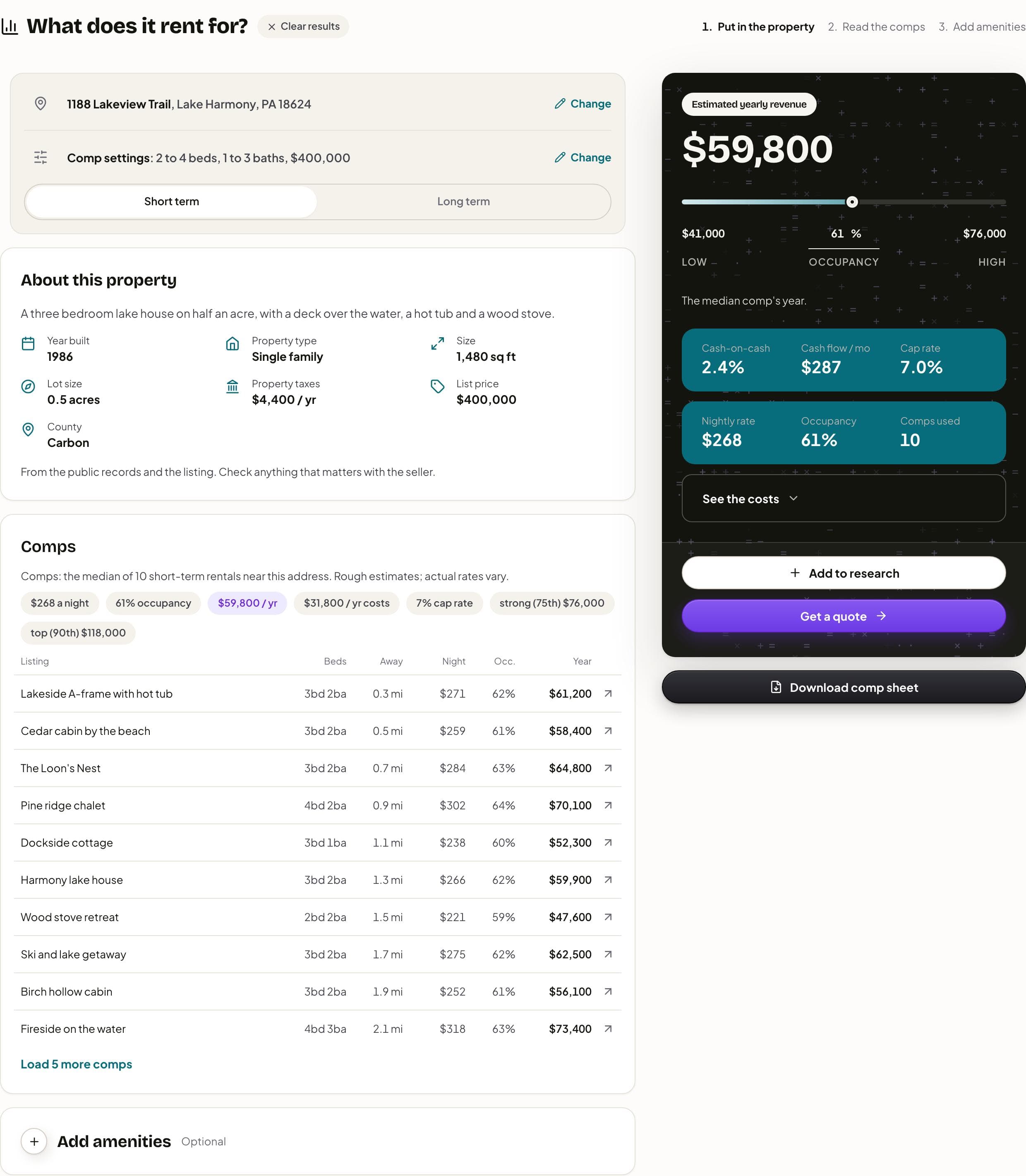
Placing the property reads its records; the comps are not asked for until step 9. Once an answer is in, Comp settings folds into one line under the address with its own Change, so the comps move up the page.
Reading the short-term answer
The dark card on the right is Estimated yearly revenue: the comps' median year, plus any amenities you add. When the comps spread out, a bar under the figure runs from a low to a high year, with the occupancy in the middle. Slide it, or type an occupancy, and the year follows at the comps' nightly rate; Return to median puts it back. Under it sit Nightly rate, Occupancy and Comps used.
Analyze this property adds three figures at the median year: Cash-on-cash, Cash flow / mo and Cap rate, worked on the purchase price and an example loan that the button's tip describes. See the costs opens the year line by line, down to net operating income, the mortgage and cash flow, then the cash it takes. The analysis needs a purchase price and the home's square feet, and says which one to add when either is missing. If you ran Quick comps first, the card offers Analyze this property on the same answer and does not buy the comps again.
On the left, under Comps, a sentence says what the figure rests on, a row of chips repeats the nightly rate, occupancy and year, and the table lists each rental: Listing, Beds, Away, Night, Occ. and Year. A row opens that listing on Airbnb in a new tab. Load 5 more comps widens the list, and the median moves with it. When three comps or fewer answer, on either side, a yellow note says the property may be rural, or in an area without reliable comparisons. About this property shows the facts the lookup read, and the listing's own description when it came with one.
Reading the long-term answer
On Long term, the card reads Estimated monthly rent, with a bar from the model's low to its high, then Per sq ft, Per bedroom and Comps used. The table lists the comparable homes: #, Address, Beds, Sq ft, Away, Match and Rent. Match is how closely each home resembles this one. Clicking a row copies its address, which is handy for looking it up yourself.
Each side keeps its own answer for the house on screen. Switch between Short term and Long term and nothing is lost; if one side has run and the other has not, switching runs the other for the same house. A new house clears both.
For a building the records count as two or more units, the property box splits it into units, marked Estimate until you change one under Add more details. Each kind of unit is then priced from its own comps and added up, on either side.
Amenities, your own numbers and the comp sheet
Add amenities (marked Optional) puts features on top of the comps. On short term each one carries a rough yearly figure, such as Private pool or Hot tub; on long term, a monthly one, such as Washer and dryer in the unit or Fenced yard. Press the plus beside one to add it, then change its figure to what your market supports, or name your own under Something else. The line under the headline says how much came from the comps and how much from amenities.
If you put the property in on Manually, or press Calculate manually after a lookup fails, Comp settings gains Your numbers: Nightly rate and Occupancy on short term, Monthly rent on long term. The figure is worked from what you type, with nothing looked up, and the comps stay one press away once the address is placed.
Once comps are back, Download comp sheet makes a PDF in your browser from the answer on screen: the property, the figure, how the comps were chosen and every comp. Nothing is looked up again to make it.
Free runs, daily limits and early access
Without an account, your first address is free, and a run is an address, not a press: you can search again, switch sides and load more comps on that house. A second address opens Make a free account to keep going, with Sign up free and Log in. GoDoor is open by invitation while it is in early access, so a new account needs an invitation for now. The tools also have daily limits on lookups; when one is reached, the calculator says so in plain words, and you can still put the property in on Manually and type your own figures.
The calculator remembers your last result in this browser for two weeks. Clear results, beside the title, empties it.
Take it further
At the foot of the answer card are Add to research and Get a quote. Signed in, Add to research puts the property on your research board, and Get a quote saves a quote with the address, the purchase price and this side's yearly income, then opens its questionnaire; it asks for a purchase price first if there is none. Signed out, both lead to GoDoor's sign-up, which is by invitation during early access. Talk to our experts, under the card, opens a shelf for booking a call with GoDoor's team.
A lender reads short-term income its own way. DSCR loans for short-term rentals explains how, and how to calculate DSCR shows the ratio the rent feeds. To price a loan on the figure, the quote calculator takes it from there.
Frequently asked questions
Is the rent calculator free, and do I need an account?
It is free, and your first address needs no account. You can rerun that address, switch between short term and long term and load more comps without using anything more. A second address asks you to make a free account. GoDoor is open by invitation while it is in early access, so new accounts need an invitation for now.
Where do the comps come from?
On short term, from nearby short-term rental listings that match the home's beds and baths, nearest first, each linked to its listing on Airbnb with its nightly rate, occupancy and last year's revenue. On long term, from asking rents on comparable homes nearby, which are not signed leases. Treat both as a market read, not a guarantee, and open a few comps yourself.
Why might a lender count less than this figure?
A lender sizes a loan on the rent it is willing to count, which for a short-term rental is often less than a full projection, and some fall back on long-term market rent. The calculator shows the market; the lender's figure is the lender's. The guide to DSCR loans for short-term rentals walks through the usual methods.
Can I see cash flow without a purchase price?
No. Cash flow, cash-on-cash and the cap rate need a purchase price and the home's square feet, and the card says which is missing. Quick comps works without either and still gives the year, the nightly rate, the occupancy and the comps. Type a price under Comp settings and press Analyze this property to see the deal.
What if the lookup cannot find the house?
The property box says so and offers Calculate manually beside Use this property. With it, or by entering the property on Manually, you type a nightly rate and an occupancy, or a monthly rent, and the calculator works the figure from those. Once the address is placed on the map, the comps are still one press away.
General education, not financial, tax or legal advice. Figures are examples: rates, rules and programs change, and every lender sets its own. Last checked November 5, 2026. How we research these guides.