After your quote is reviewed and priced, your broker sends a term sheet: what a lender is prepared to do, in writing, with one or more rates to choose from. In GoDoor it is the Term sheet page of your property's entry. You compare the options, pick one and accept it in a single step, and accepting moves your loan on to the application.
GoDoor's app is open by invitation while it is in early access, so this page is for people who already have an account. The free tools, such as the quick quote and the rent calculator, need no account.
Where your term sheet shows up
You do not have to watch for it. When your broker issues a term sheet, GoDoor tells you in several places at once:
- The bell at the top right of every page shows "Your term sheet is ready", and the task "Review your term sheet and choose a rate" under Your tasks.
- An email titled "Your term sheet is ready", with a Review your rates button that opens the page directly. It comes only while the Term sheets switch is on in your account's Notifications.
- The board. In 2. Quotes, the property sits under Term sheets, its status reading "Review, choose rates".
- The entry's overview. The Term sheet card is marked "Waiting on you" and says which version was sent, when, and how many rates there are to choose from.
What the term sheet page shows
The page is headed "Term sheet", with the line "Choose the rate you want, then accept it." under it. Then, from top to bottom:
The property. A coverage ring with the DSCR in the middle, the address and the home, and a sentence that reads the coverage in words with the monthly payment. For a short-term rental, four figures from comparable listings follow: Projected revenue, Occupancy, Average nightly rate and Confidence (how many rentals the figures rest on). A long-term rental shows the rent a month, its range and the comparables instead. The ring follows the rate you pick, so its number changes as you move between options.
Your terms. The table of rates, headed by the term sheet's version and the date the terms were last updated (and how long they stand, when the sheet has an end date). The chip on the right says where it stands: "Your move" while it waits on you. Each row is one option, in five columns:
| Column | What it shows |
|---|---|
| Rate | The rate, the loan's structure and the prepayment penalty |
| Loan | The loan amount and its loan-to-value ratio |
| Payment | The full monthly payment: principal, interest, taxes, insurance and HOA |
| Coverage | The DSCR at that payment |
| Cash to close | A range, because third-party costs are estimates until closing |
The payment column is the PITIA that our guide to PITIA explains, and the trade between the rows is usually rate against leverage and prepayment terms, which DSCR loan rates and DSCR prepayment penalties cover. On GoDoor's made-up sample sheet, the one behind the picture below, the first option is 7.25% with a 3 yr prepay at 75% LTV, and the second is 6.875% with a 5 yr prepay at 70% LTV: a lower rate, paid for with more cash down and a longer penalty. The figures are an example, not a quote.
Two notes. At the foot of the table, two notes every rate carries: the terms are non-binding until you sign the loan documents, and your rate locks once your credit (FICO) is approved and the appraisal is paid, moving with the market until then.
The full term sheet. Under the table, The full term sheet folds open the whole sheet as issued, and Download PDF saves it.
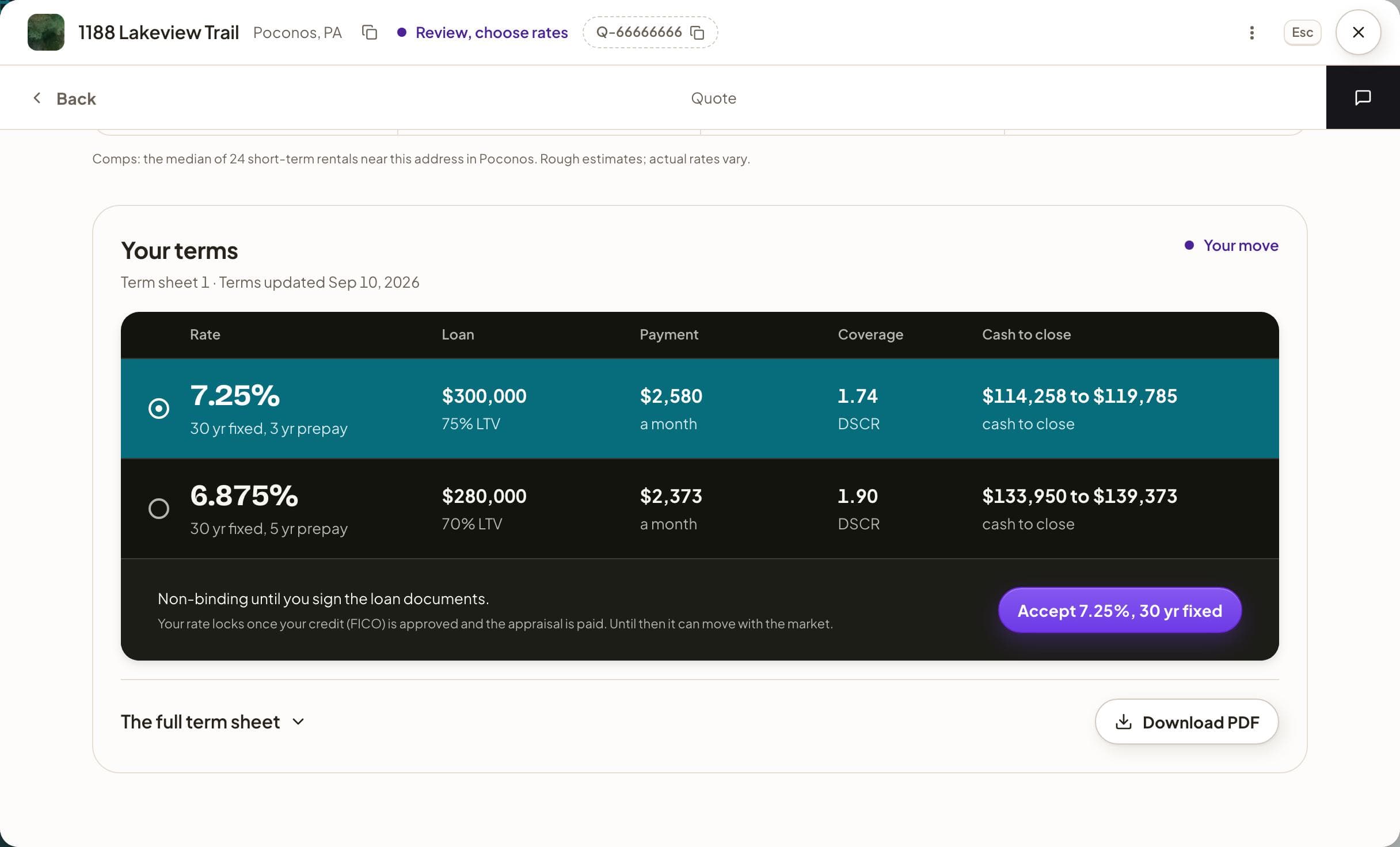
Choose and accept a rate, step by step
- Open 2. Quotes in the sidebar and click your property under Term sheets. (From the email, Review your rates takes you straight to step 3.)
- On the entry's overview, press Choose your rate on the Term sheet card.
- Read the property summary at the top: the coverage ring, the sentence under the address, and the comparables.
- Under Your terms, compare the rows: the rate and prepayment, the loan, the monthly payment, the coverage and the cash to close.
- Click the row you want. Its dot fills, and the coverage ring at the top updates to that option.
- Check the violet button at the foot of the table. Until you choose, it reads Choose a rate to accept and cannot be pressed; once you have, it names your choice, for example Accept 7.25%, 30 yr fixed on the sample sheet.
- Press it. A note confirms "Terms accepted. Your GoDoor broker will be in touch with next steps."
After you accept
You stay on the page, and it becomes the record of what you chose. The row you took is tagged "Accepted", the chip at the head of the table reads "Accepted" with the date, and the foot spells out the terms in one line: the option number, the rate, the structure, the prepayment, and the loan with its loan-to-value ratio. The other rates step back and can no longer be chosen.
Your loan moves from 2. Quotes to 3. Deals, and the status at the top of the entry reads "Upload your documents". Press Go to the application at the foot of the table to open the application, where you upload your documents. Back on the overview, the Term sheet card now says what you accepted, and the Application card is the current step.
If the terms change, or you want them changed
Your broker can send a new version of the sheet. While the page is open, GoDoor checks for one every minute and again whenever you come back to the window. A new version replaces the one on screen with the note "We updated your terms. Have a look before you answer.", and any rate you had picked on the old version is cleared, so you choose again.
If none of the options fits (you want less leverage, a shorter prepayment penalty, or a different structure), the page has no change button. Press the black messages button (the speech bubble) at the far right of the entry's second bar, and tell your broker in Messages what you would like. The same applies after you accept: the page does not offer a second choice, so ask in Messages.
What the full term sheet adds
The full term sheet is the document your options come from, with the options as columns so each row compares them directly. It covers the file the sheet was priced on, each option's loan amount, loan-to-value ratio, rate and prepayment penalty, the monthly payment and DSCR, the costs (the exact ones apart from the third-party costs, which are estimated ranges), the cash at closing, and the reserves you will need to show. Then come what the numbers rest on and the disclosures, and, when your broker includes them, how the income was counted, how the process works and what happens next. Download PDF saves the same copy to keep or share with a partner.
Frequently asked questions
Is a term sheet a loan approval?
No. It is what a lender is prepared to do, in writing, based on the figures in your file, and it is non-binding until you sign the loan documents. Underwriting still follows: the lender checks your credit, the appraisal, the documents and the property. The DSCR loan process explains each of those steps.
When does my rate lock?
Your rate locks once your credit (FICO) is approved and the appraisal is paid. Until then it can move with the market, so the rate on your term sheet is the one priced when the sheet was issued. If your broker reprices it, a new version of the sheet replaces the old one and GoDoor tells you.
Why is cash to close a range?
Part of it is exact and part is estimated. The down payment and the loan fees listed as exact are fixed amounts on the sheet. Third-party costs, such as the appraisal, title and escrow, recording, prepaid interest and the escrow deposits, are estimates until the closing figures are final, so the total is shown from low to high. The full term sheet lists each one.
Can I change my mind after I accept a rate?
The page does not offer a second choice once you have accepted: it keeps the record of the option you took. If you want different terms, write to your broker in Messages on the entry, and your broker can tell you what can still change. Before you accept, that is also the way to ask for a different option.
Do I need an account to see a term sheet?
Yes. A term sheet belongs to a quote on your own account, and GoDoor's app is open by invitation while it is in early access. The free tools on the site, the quote, rent, value and deal calculators, need no account, so you can run the numbers on a property before you are invited.
General education, not financial, tax or legal advice. Figures are examples: rates, rules and programs change, and every lender sets its own. Last checked November 5, 2026. How we research these guides.