GoDoor's value calculator gives two answers for one address. Find value is what the home is worth in the condition it is in today. Calculate ARV is its after repair value: what it could be worth once the work you plan is done, and what that work leaves you with if you sell or refinance.
It is for investors weighing a purchase, a rehab or a refinance before they spend on an appraisal. Both sides read one valuation from public records and the sales around the home, both show the math line by line, and your first address needs no account.
What the value calculator is for
The page is titled Value calculator, and its two sides answer two different questions. On Find value, the home is valued as it stands, in the condition you confirm: that is the number to set against an asking price. On Calculate ARV, you say where the work takes the home, add your purchase price and rehab budget, and the calculator works out the after repair value and the deal around it: what you have in it, the equity, the profit if sold and a refinance.
Condition matters because an appraiser rates every home on six steps, C1 (new) to C6 (poor), and the same house is worth more in better condition. The calculator shows this home's value in each condition, so a lower rating at the appraisal is no surprise. For the idea behind the second answer, read what after repair value is, and for how an appraiser arrives at a figure, the rental property appraisal.
Find a home's value, step by step
- Open the value calculator. The Choose a property window opens on its own; if you close it, Choose property opens it again.
- On Smart fill, type the street address and pick it from the list that drops down.
- Press Enter to look the property up. (Or, on Zillow link, paste the listing's link and press Read the link.)
- Check the card that comes back: beds, baths, size and type. If one is wrong, press Override results, correct it and press Save.
- Press Use this property. The address sits at the top of the calculator, with Change to swap it.
- Under What to work out, leave Find value selected.
- Press Submit.
- Under Condition, check Condition today against the listing's photos, and change it if they show otherwise.
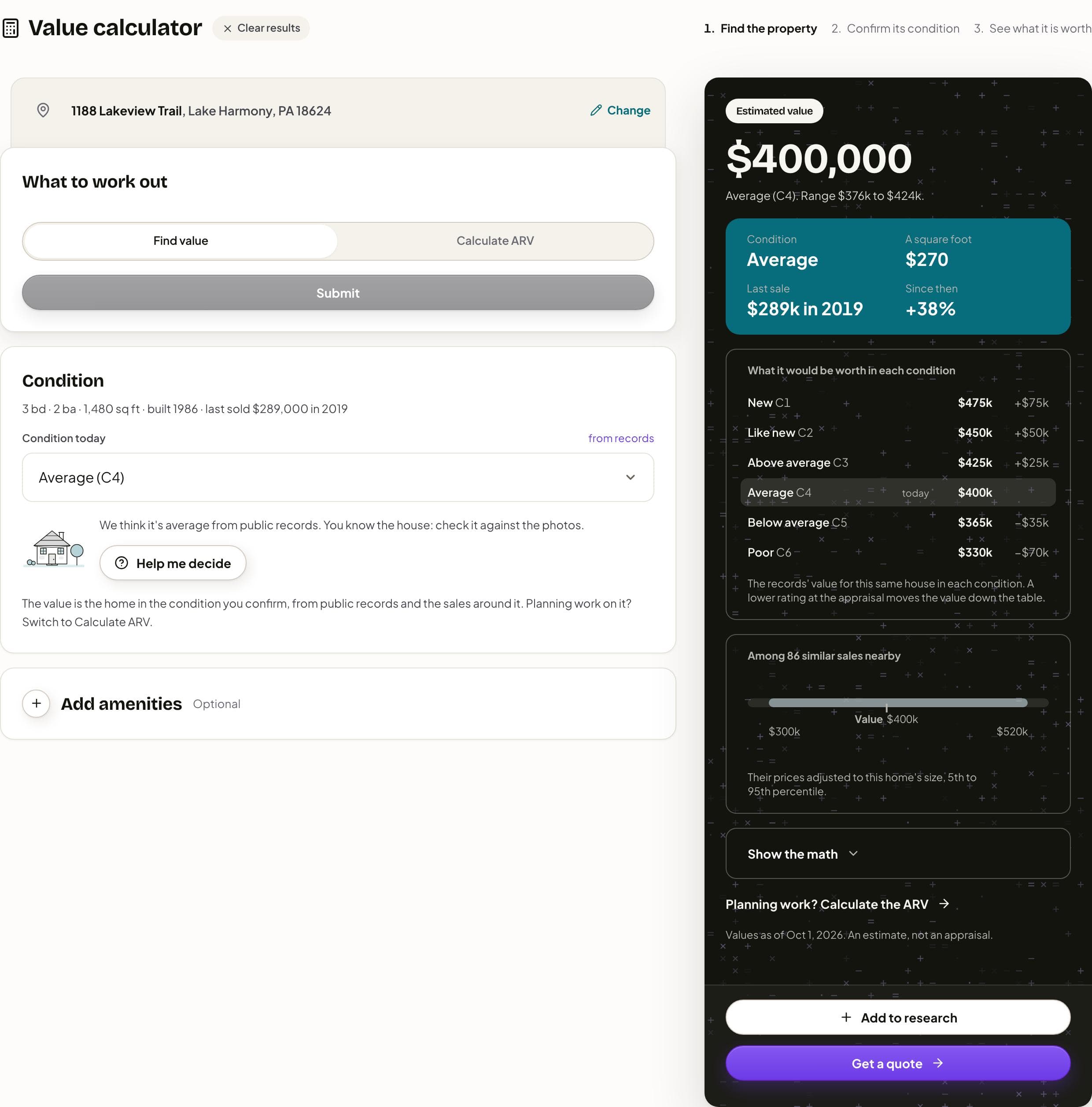
Condition today starts at the calculator's read from public records, with a sentence saying so and a drawing of a house in that condition. Help me decide opens How condition is rated: each of the six steps in plain words with this home's value in it, the calculator's read marked Our read, and what to look for in the photos. Nothing changes until you press Use with the condition's name (for example, Use Like new), or Cancel.
Reading the value
The dark card reads Estimated value: the home in the condition you confirmed, plus any amenities you add. The line under it names the condition and gives the range. Below sit Condition, A square foot, Last sale and Since then (how far the value has moved since that sale).
What it would be worth in each condition lists the home at every step from C1 to C6, today's marked, each with its difference from today. The panel under it counts the similar sales nearby and places the value on a bar of their prices, adjusted to this home's size, from the 5th to the 95th percentile. Show the math opens every line and where its number came from, and Export CSV downloads the same lines. A home rated C5 or C6 carries a note that it is not rent-ready, which matters if you plan a DSCR loan on it.
Add amenities (marked Optional) is for what the records may miss, such as Pool, Central air or Extra bathroom, each at a rough figure you can change. A feature the records already count is marked In the records, so you do not count it twice. The card's foot gives the date the values are as of, and says it is an estimate, not an appraisal.
Work out the after repair value
- Under What to work out, press Calculate ARV. (A link to the ARV side opens on it directly; if the home is not valued yet, press Submit.)
- Under The work, check Condition today.
- Choose After the work: the condition the work will reach.
- Type Adding square feet if the work adds space.
- Check Purchase price, which starts at today's value.
- Type the Rehab budget, your contractor's number.
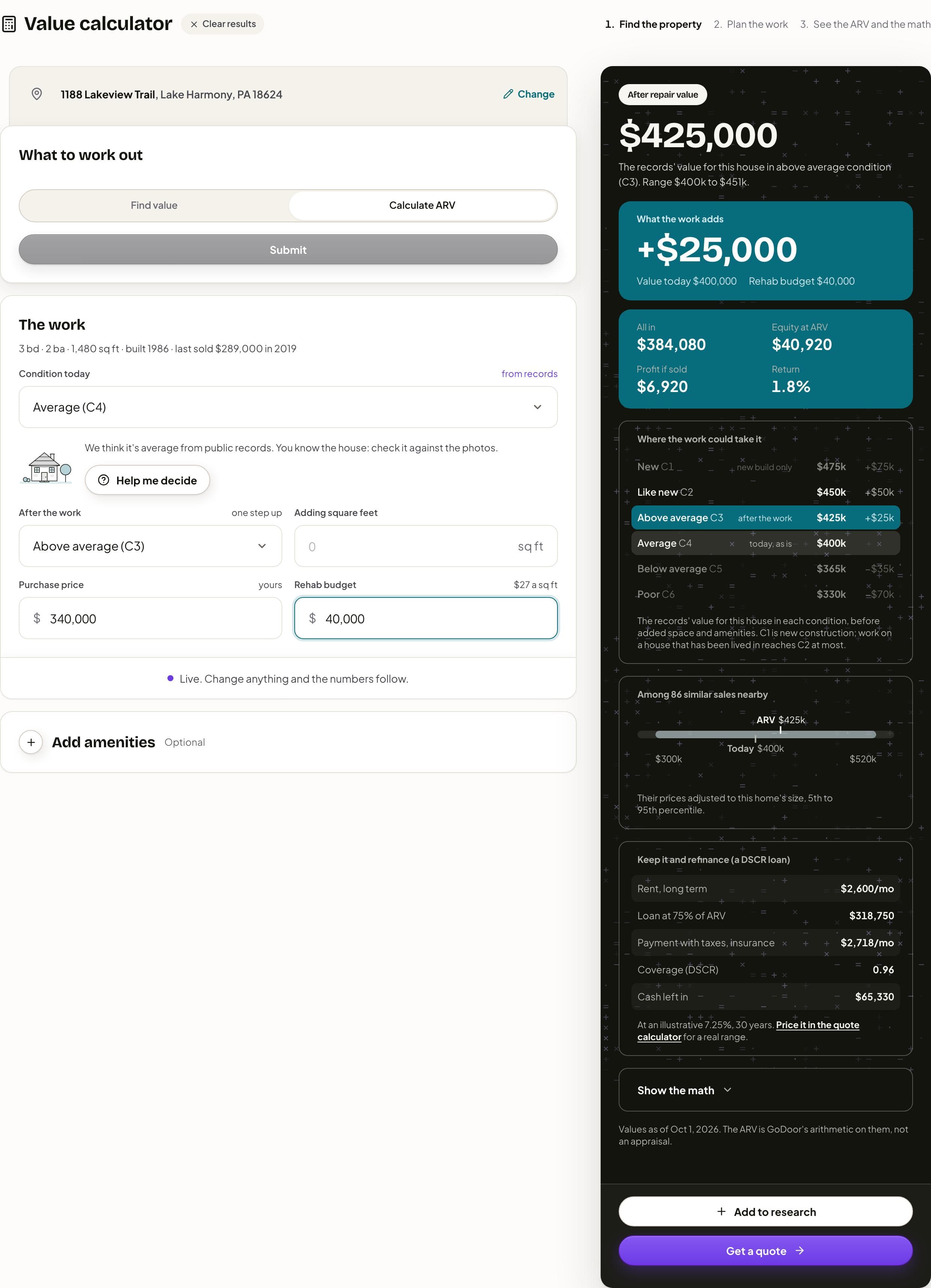
After the work starts one step above today, at least Average (C4) and at most Like new (C2), since C1 is new construction; a home already at Like new stays there. Change it and the after repair value follows. The note "Live. Change anything and the numbers follow." means there is nothing to press again.
Reading the ARV and the deal
The card reads After repair value, with a line saying what it rests on (the home's value at the condition the work reaches, any space added and any amenities) and its range. What the work adds is the after repair value less today's value, shown beside the value today and your rehab budget.
Next come All in (the price, the rehab, holding costs and any additional costs), Equity at ARV, Profit if sold and Return. They wait for a purchase price and a rehab budget; until then a button, Add rehab budget or Add purchase price, takes you to the empty field. Where the work could take it lists the home in each condition, with the one the work reaches filled and the steps it cannot reach dimmed.
Keep it and refinance (a DSCR loan) sketches a refinance at the after repair value: the loan, the payment with taxes and insurance, Coverage (DSCR) when a rent is known, and the cash left in or taken out, at an illustrative rate the panel states, with a link to price it in the quote calculator. Show the math lists every line, including the holding and selling costs the deal uses, and under The deal it has Additional costs for anything else, such as loan interest or permits; it adds to All in. The page gives no verdict: no rule of thumb and no red. The numbers are there for you to judge, and the BRRRR method and the DSCR cash-out refinance explain the plays they feed.
When there is no value
While it values a home, the calculator reads Searching the public records, and if they have no value it asks a second value model at once (Searching deeper). If neither has one, the We could not find a value window offers Find a proxy: value a similar home nearby that listed or sold lately, sized to this one, through Search nearby or Enter an address and Use this as proxy. The yellow note where the value would be brings the window back with More search options.
You can always go on with your own figures: Type your own value on Calculate ARV opens After repair value as a field, and with a price and a rehab budget the rest runs. A valuation that did not answer offers Try again. Free use works as in the other calculators: your first address needs no account, and a run is an address, not a press. A second address opens Make a free account to keep going, and GoDoor is open by invitation while it is in early access. The valuations also have a daily limit, and when it is reached the page says so and opens the fields for your own numbers.
Add to research and Get a quote sit at the foot of the card. On Find value, Get a quote starts a purchase quote at the value on screen; on Calculate ARV, a cash-out refinance at the after repair value. Signed out, both lead to GoDoor's sign-up, by invitation during early access. Clear results, beside the title, empties the calculator, which otherwise remembers your last result in this browser for two weeks.
Frequently asked questions
Is the value calculator free, and do I need an account?
It is free, and your first address needs no account. You can switch between Find value and Calculate ARV, change the condition and type the work on that address as often as you like. A second address asks you to make a free account, and GoDoor is open by invitation while it is in early access, so new accounts need an invitation for now.
Is the value an appraisal?
No. It is an estimate from public records and the sales around the home, dated on the card, and the page says so. A lender orders its own appraisal, and the appraiser's condition rating can differ from the calculator's. That is why the calculator shows the home in every condition: you can see what a lower rating would mean before it happens.
Why does the condition change the value?
Appraisers rate a home's condition from C1, new, to C6, poor, and a home in better condition is worth more. The calculator values this house at each step, starts at its read from public records and lets you change it to what the photos show. Help me decide explains each step and what to look for.
How is the after repair value worked out?
It is the records' value for this house at the condition the work reaches, plus any square feet you add, priced from this home's value a square foot at that condition, plus any amenities you add. Show the math lists each part and where its number came from, and Export CSV downloads it.
What if the calculator finds no value for the address?
It asks a second value model by itself. If that has none either, it offers a proxy, a similar home nearby that listed or sold lately, sized to this one, or you can type your own after repair value and price on Calculate ARV. New builds and homes not yet in the records are the usual cases.
General education, not financial, tax or legal advice. Figures are examples: rates, rules and programs change, and every lender sets its own. Last checked November 5, 2026. How we research these guides.